
Click Studies in the top navigation to open My Studies, where every study for your current team lives in one place. Open a draft, monitor live fieldwork or start a new study.
To see more than your own studies, hover over the arrow next to Studies and choose Public Studies or All Studies.
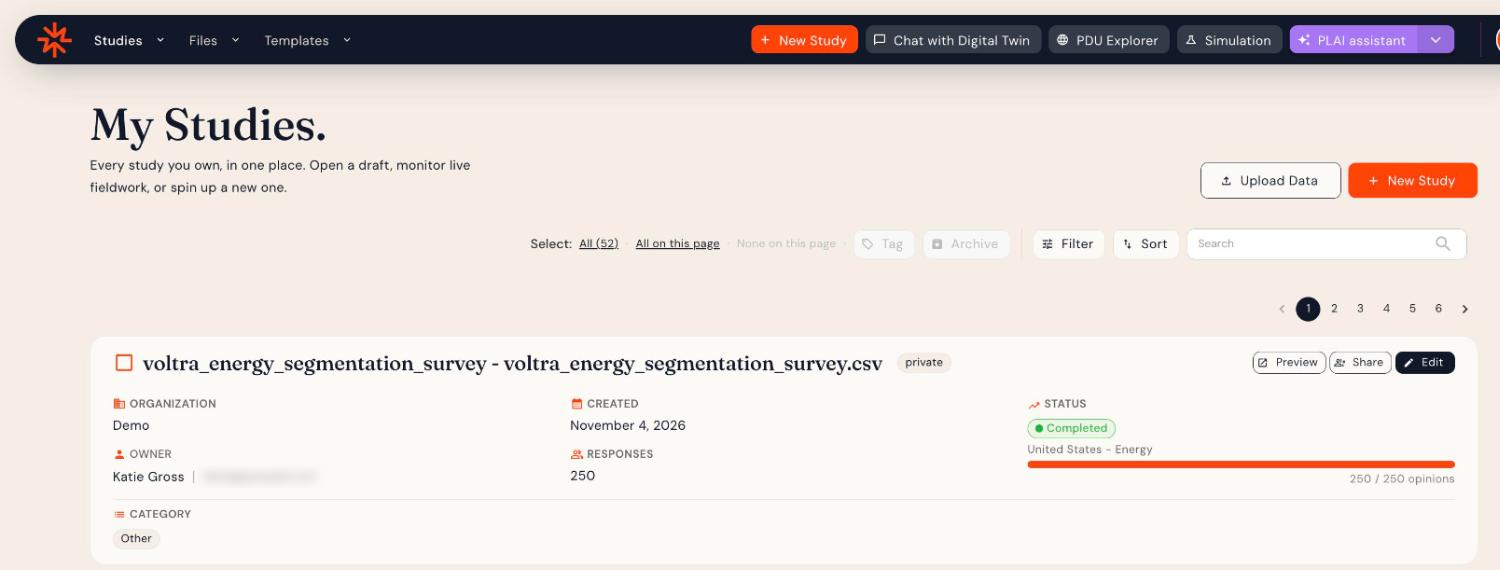
Study cards
Each study shows:
- Its title and visibility (for example, private)
- Organization, Owner, Created date and number of Responses
- Status (for example, Completed), the audience and a progress bar of completes
- Category and Tags
Use the buttons on each card to Preview the survey, Share it with another team, or Edit (open) the study.
Finding studies
- Search: type part of a study name.
- Filter and Sort: narrow and order the list.
- Or ask Plai, for example "Find studies about pricing."
Organizing studies
Select studies with the checkbox on each card, or use Select: All / All on this page. Then:
- Tag to add tags to the selected studies
- Archive to remove studies you no longer need from the list
Starting something new
- New Study: see Creating a Study from Scratch.
- Upload Data: bring in data from another survey tool. See Uploading Your Structured Data.