
Panoplai allows you to apply the same AI Topics code frame across multiple studies or questions. This is especially useful when comparing results between human and synthetic studies or ensuring consistent categorization across datasets.
Step 1: Finalize Your Code Frame
Start by establishing and finalizing your code frame in the one study.
-
Open the relevant open-ended question.
-
Scroll to the Tree Map and toggle to AI Topics.
-
Select AI Topics Framework to generate topics.
-
Edit topics as needed until the framework is finalized.
-
If you make changes, toggle back to AI Topics and select Analyze Comments using existing AI Topics to recategorize responses.
This ensures your finalized code frame is consistently applied within the original study.
Step 2: Apply the Code Frame to Another Question or Study
Once your code frame is finalized, you can apply it to a another study with a similar or matching question.
-
Navigate to the target study and open the corresponding open-ended question.
-
Go to AI Topics → AI Topics Framework.
-
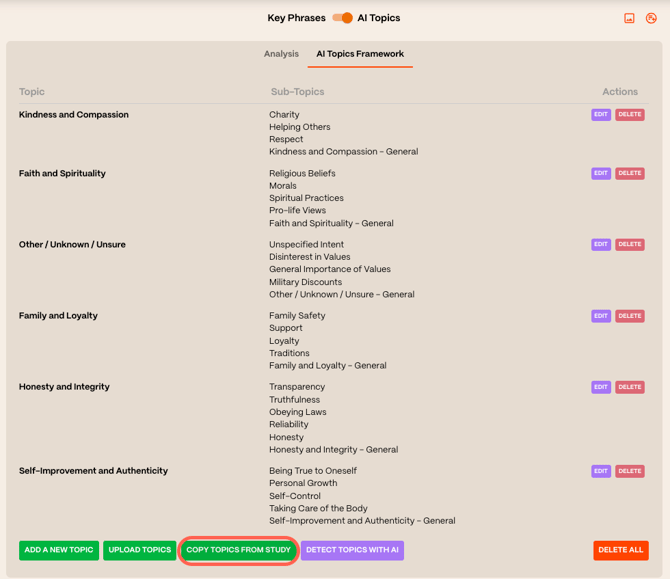
Select Delete all if AI Topics are already generated, then choose Copy Topics from Study.
-
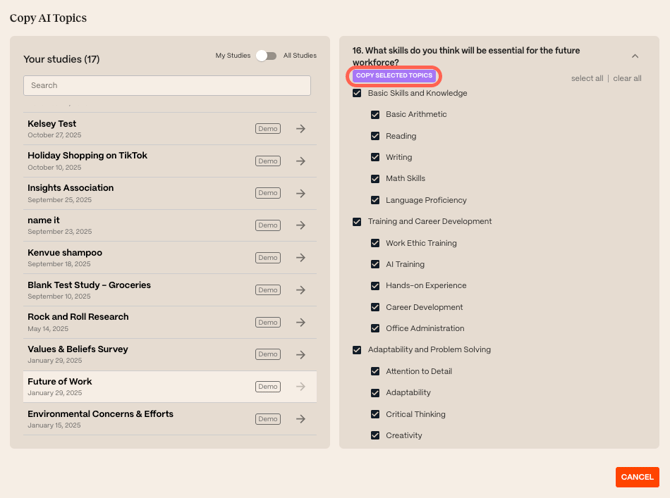
Select the source study and question.
-
Select all topics and click Copy Selected Topics.
-
Toggle back to AI Topics and select Analyze Comments.
The responses will now be categorized using the same code frame as the source study.
When to Use a Shared Code Frame
Using a common code frame is helpful when:
-
Comparing responses across studies
-
Standardizing analysis for reporting or dashboards
📌 Important Notes
-
Copy code frames only between comparable questions
-
Finalize the source code frame before copying to avoid rework
-
Copying topics replaces existing topics in the target question