
Panoplai allows you to manually recode individual open-ended responses after AI Topics have been generated. This gives you flexibility to refine categorization, override AI interpretations when needed, and ensure responses reflect your analytical judgment.
Before You Start
Make sure AI Topics have already been generated for the open-ended question. Manual recoding is available only once responses have been assigned to a topic.
How to Recode a Response
-
Open the relevant open-ended question.
-
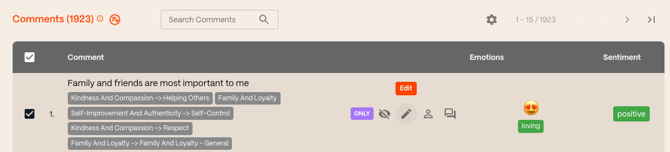
Scroll down to the Comments table.
-
Locate the response you want to update and select Edit.
-
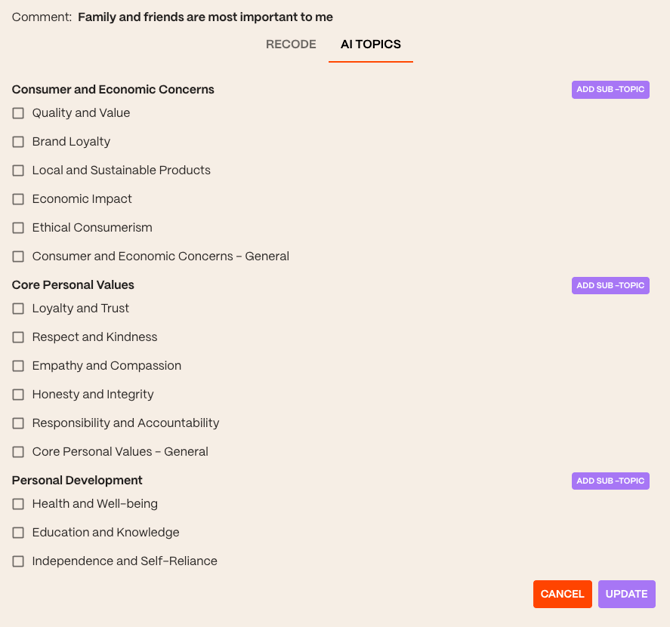
Click to the AI Topics tab.
-
Assign or unassign topics as needed.
-
You can also create a new topic here if necessary.
-
-
Select Update to save your changes.
The response will immediately reflect the updated topic assignments.
When to Recode a Response
Recoding is helpful when:
-
A response was miscategorized by AI
-
You want to override an AI categorization for a specific response that doesn’t reflect your interpretation
📌 Important Note
-
Recoding only applies only to the selected comment