
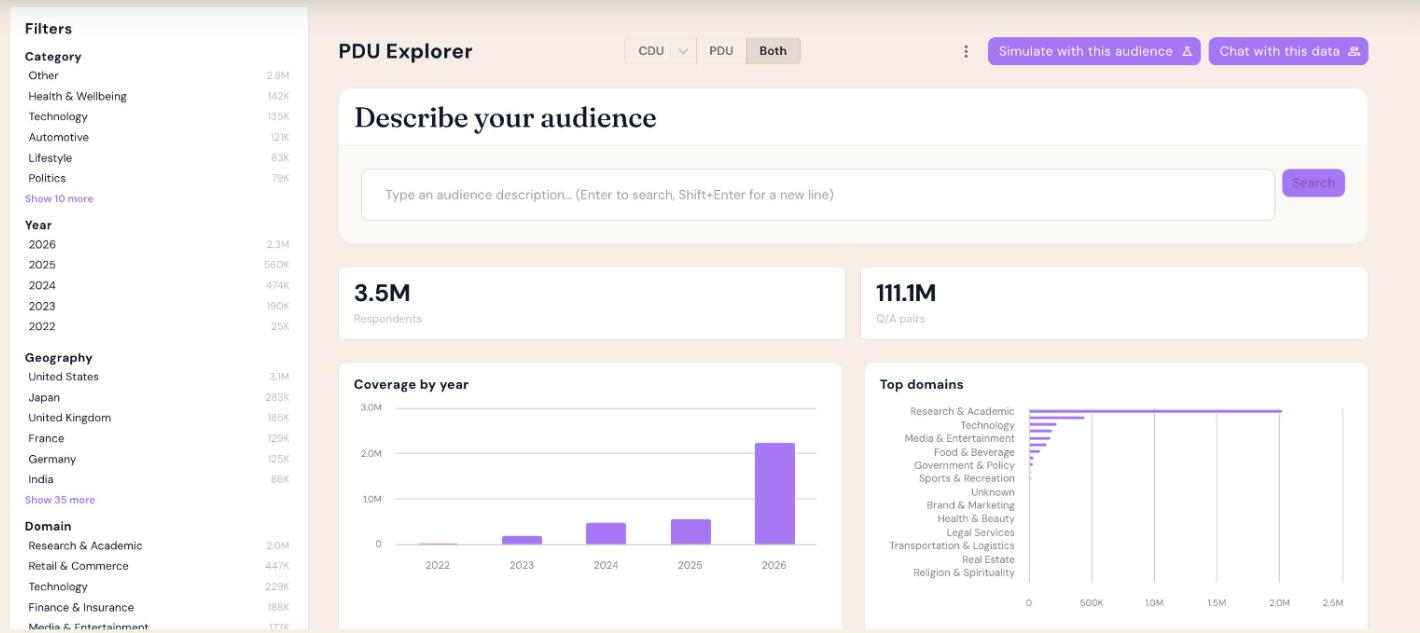
PDU Explorer is your window into everything your data knows. It shows the composition of your own research (your Client Data Universe, or CDU) alongside the Panoplai Data Universe (PDU), so you can see what audiences, topics, demographics and insights are already available before you commission anything new.
The problem it solves
Valuable research tends to get scattered across studies and files, which makes it hard to know what you've already learned. Teams end up commissioning research they've already run. PDU Explorer closes that gap.
How to use it
- Click PDU Explorer in the top navigation.
- Choose what to search with the toggle at the top: CDU, PDU or Both.
- Under Describe your audience, type the audience or topic you're interested in (for example, males in the US who like pizza) and click Search.
- Narrow the slice with the Filters panel: Category, Year, Geography, Domain and Perspective.
- Review what's available: respondents and Q/A pairs, coverage by year, top domains, geography (map, chart or table) and What's in this slice (demographics and questions).
- Act on it:
- Simulate with this audience saves the slice as an audience and opens Simulation.
- Chat with this data starts a Digital Twin conversation grounded in the slice.
Common use cases
- Discover existing research before commissioning something new
- Avoid duplicate research spend
- Understand the make-up of your own audiences (for example, gender or geographic skew)
- Find knowledge gaps and fill them with a shorter, targeted study
- Explore competitor and industry data in the Panoplai Data Universe
Good to know
PDU Explorer is included in your platform subscription. It's a great first stop before any new research project.